
Design & Print Tips
Why Vector Files Will Change How You Think About Graphics (And Why SVG is Your New Best Friend)
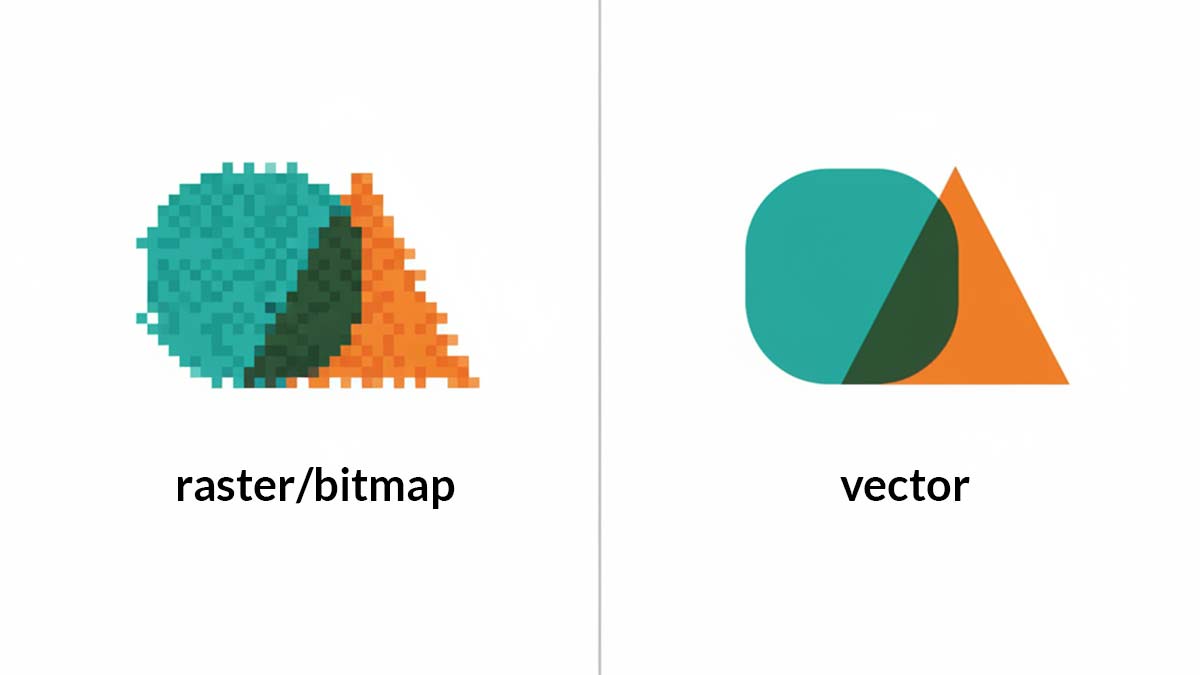
Picture this: you’ve just spent three hours perfecting a logo in Photoshop, only to realize your client needs it for everything from business cards to billboards. Cue the panic. This exact scenario taught me why understanding vector files isn’t just useful—it’s essential for anyone dealing with graphics.
What Exactly Are Vector Files? (And Why Should You Care?)
Vector files store graphics as mathematical formulas instead of pixels. I know, I know—math sounds boring. But here’s the magic: these formulas describe shapes, curves, and colors in a way that scales infinitely without losing quality.
Think of it like this: a traditional photo (raster) is like a mosaic made of tiny colored tiles. Zoom in too much, and you’ll see individual tiles looking blocky. A vector graphic is more like instructions for drawing—”draw a perfect circle here, add a red line there.” No matter how big or small you make it, those instructions create a crisp, clean image.
The Real-World Difference
I learned this the hard way back in 2015 when a client asked for their logo at 300% larger than original size. The JPEG version looked like it went through a blender, but the vector version? Absolutely pristine. That’s when it clicked—vectors aren’t just technical files; they’re problem solvers.
SVG: The Internet’s Favorite Vector Format
SVG (Scalable Vector Graphics) has become the go-to vector format for web designers, and for good reason. Unlike other vector formats that need special software to open, SVG files work directly in web browsers and can be edited with basic code.
Why SVG Rocks for Modern Design
- Web-friendly: Browsers display SVG files natively—no plugins needed
- Tiny file sizes: Perfect for website speed optimization
- SEO benefits: Search engines can read SVG text content
- Interactive potential: You can animate and modify SVGs with CSS and JavaScript
- Accessibility: Screen readers can interpret SVG content properly
FYI, I’ve saved countless hours using SVGs for icon systems. One file works everywhere, from mobile apps to desktop software.
Vector vs. Raster: When to Use What
Here’s my take after 10+ years in the trenches:
Choose Vectors When:
- Logos and branding elements (trust me on this one)
- Simple illustrations with solid colors
- Icons and UI elements
- Anything that needs to scale dramatically
- Print materials requiring crisp edges
Stick with Raster For:
- Photographs (obviously)
- Complex artwork with lots of detail and color variation
- Digital paintings with texture and depth
Bottom line: If it’s simple and needs to be flexible, go vector. If it’s complex and photographic, stick with raster.
Common Vector File Formats (Beyond SVG)
While SVG dominates web use, other vector formats serve specific purposes:
- AI (Adobe Illustrator): Industry standard for print design
- EPS (Encapsulated PostScript): Great for sharing between different design programs
- PDF: Surprisingly versatile—can contain both vector and raster elements
IMO, learning to work with multiple formats makes you way more valuable as a designer. Each has its sweet spot.
Getting Started with Vector Graphics
Want to dive in? Here are my honest recommendations:
Free Options:
- Inkscape: Surprisingly powerful and completely free
- Figma: Web-based, great for UI design and collaboration
Professional Tools:
- Adobe Illustrator: The industry gold standard (but pricey)
- Affinity Designer: Solid alternative without subscription fees
Start with free tools first. You’ll quickly discover whether vector graphics click with your workflow before investing in premium software.
The Bottom Line: Why Vectors Matter More Than Ever
In our multi-device, multi-screen world, vector graphics aren’t just nice to have—they’re absolutely necessary. Whether you’re designing for a smartwatch or a stadium screen, vectors ensure your work looks professional everywhere.
My advice? Start thinking in vectors from day one of any project. Your future self (and your clients) will thank you when that perfect design needs to work across 15 different applications without starting from scratch.
Ready to make the switch? Start with one simple icon or logo. Once you see how clean and flexible vectors can be, you’ll wonder how you ever managed without them 😃
